JPG Converter
Converts your JPG images into PNG, BMP, GIF and WebP formats easily using our free online JPG converter tool at Image Toolz.



JPG Converter Convert JPG to PNG, GIF, BMP & WebP
A client sent me a JPG logo and asked me to place it on a dark background. The moment I dropped it in, a white rectangle appeared around it, the kind that makes any design look unfinished.
One format change fixed it completely. That's the thing about image formats. The wrong one creates problems. The right one makes everything click.
What Is a JPG Converter?
A JPG converter converts your JPG image to a different format, such as PNG, GIF, BMP, or WebP, depending on your project's needs.
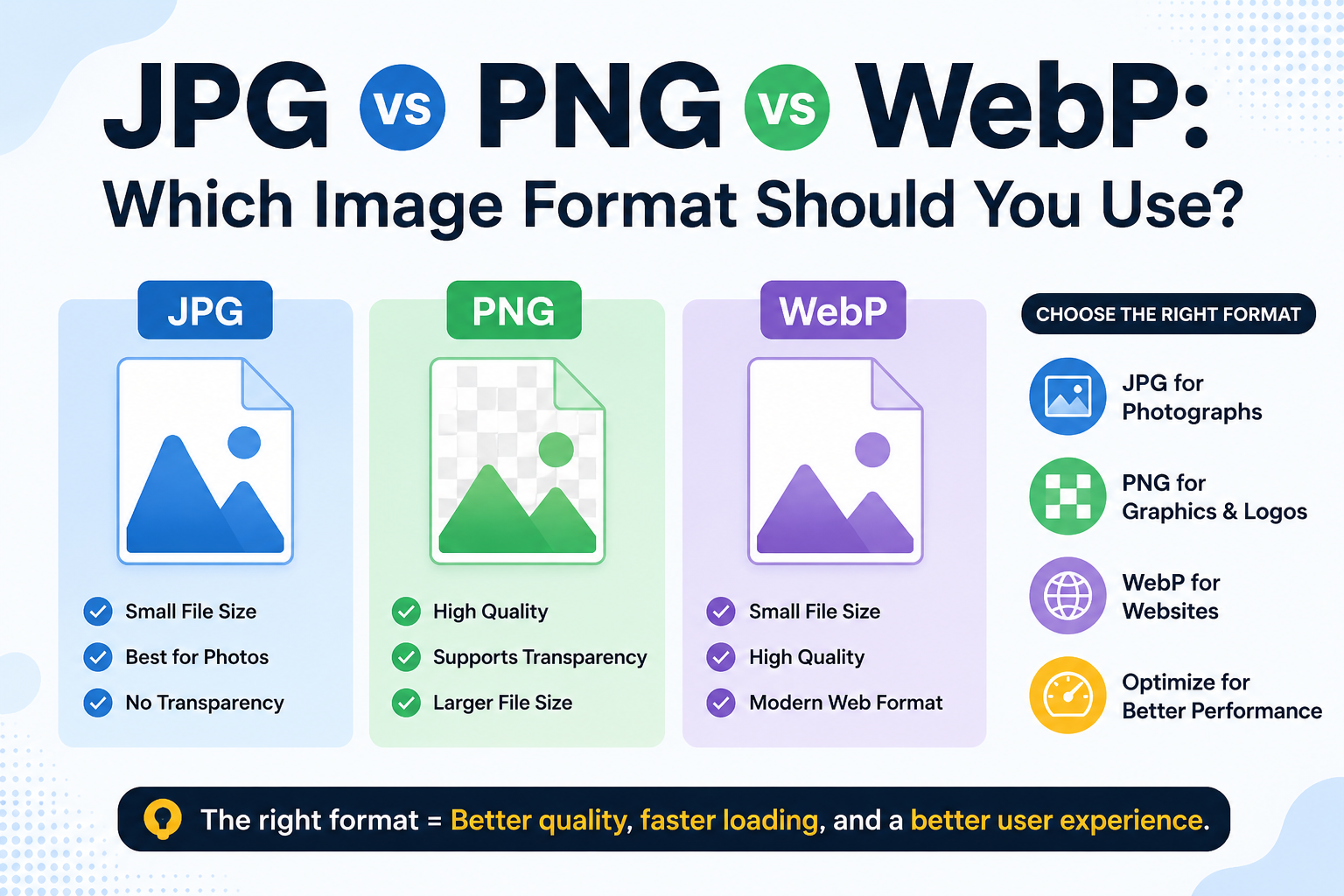
Each format serves a different purpose:
PNG preserves every pixel without compression loss and supports transparent backgrounds. It's the right choice when a clean edge matters: logos, icons, UI elements.
GIF supports basic animation and works reliably across older browsers and email platforms. Good for simple web graphics that need broad compatibility.
BMP is uncompressed and used mainly in Windows environments, print workflows, and legacy software that requires raw image data.
WebP is Google's format built for modern websites. It delivers sharp visuals with noticeably lower file weight than JPG or PNG, which is why developers increasingly prefer it.
One tool. Four output formats. No switching between different converters depending on what you need.
How to Use the JPG Converter Tool
The steps are simple:
- Open the JPG Converter at imagetoolz.online
- Click "Choose File" to upload your JPG or use "Use Remote URL" to paste a direct image link
- Under "Select New Format", choose PNG, GIF, BMP, or WebP
- Click "Convert"
- Download your converted image
Use Cases of the JPG Converter Tool
- Design work requiring clean backgrounds: When a JPG needs to sit on a colored surface in a presentation or website, converting to PNG removes the background-compatibility issue that JPGs cannot solve.
- Web performance improvements: Converting a JPG to WebP reduces the image's data footprint without visible quality loss. This directly affects page performance scores and how search engines evaluate your site's speed.
- Legacy system and print compatibility: Certain print services and older desktop applications only accept BMP. Converting your JPG is often the quickest path to getting accepted without any back-and-forth.
- Reliable email delivery: Some email clients render GIF more consistently than modern formats. Converting to GIF ensures the image displays correctly across all inboxes, including older ones.
- Multi-format client deliverables: Designers often deliver assets in multiple formats. This tool handles common outputs from a single upload, so you don't need to open Photoshop or switch between platforms.
Benefits of Using Our Tool
- Four output formats: PNG, GIF, BMP, WebP from one JPG
- Remote URL support: convert web-hosted images without downloading them
- No login required: open the tool and start immediately
- Completely free: no subscription, no hidden limits
- Browser-based: works on desktop and mobile without installation
- Files deleted after conversion: nothing is stored, full privacy
Common Mistakes to Avoid
Choosing the wrong format for the job. Converting a detailed photo to GIF will reduce it to 256 colors and noticeably degrade the result. Each format has a purpose; match it to your actual use case before converting.
Converting to PNG, expecting transparency to appear. PNG supports transparent backgrounds, but converting a JPG to PNG doesn't create one. The existing background stays. A design tool is needed to remove it afterward.
Not saving the original JPG. Always keep the source file. Some format conversions, especially to BMP, produce larger output files. If something goes wrong, you'll want the original to fall back on.
FAQs
Can I convert a JPG to WebP using this tool?
Yes. WebP is one of the four output formats. Select it from the dropdown, and the output will be a web-ready WebP file.
What happens to image quality when I convert JPG to PNG?
PNG is lossless, so it preserves the quality of the JPG. It won't recover data that was already lost during original JPG compression, but nothing further is removed.
Why convert to BMP if it produces a heavier file?
BMP is uncompressed by design, which is exactly what certain print workflows and legacy software require. The format is about compatibility, not about reducing file weight.
Is there a daily limit on how many images I can convert?
No. The tool is completely free with no conversion limit. Convert as many images as your project requires.
.png)
Image Toolz
CEO / Co-Founder
I am a software engineer, web developer, and Google AdSense expert with two years of experience. I created a free image tools website to provide easy and accessible image tools for everyone.
Popular Tools
Recent Posts